Using GUI
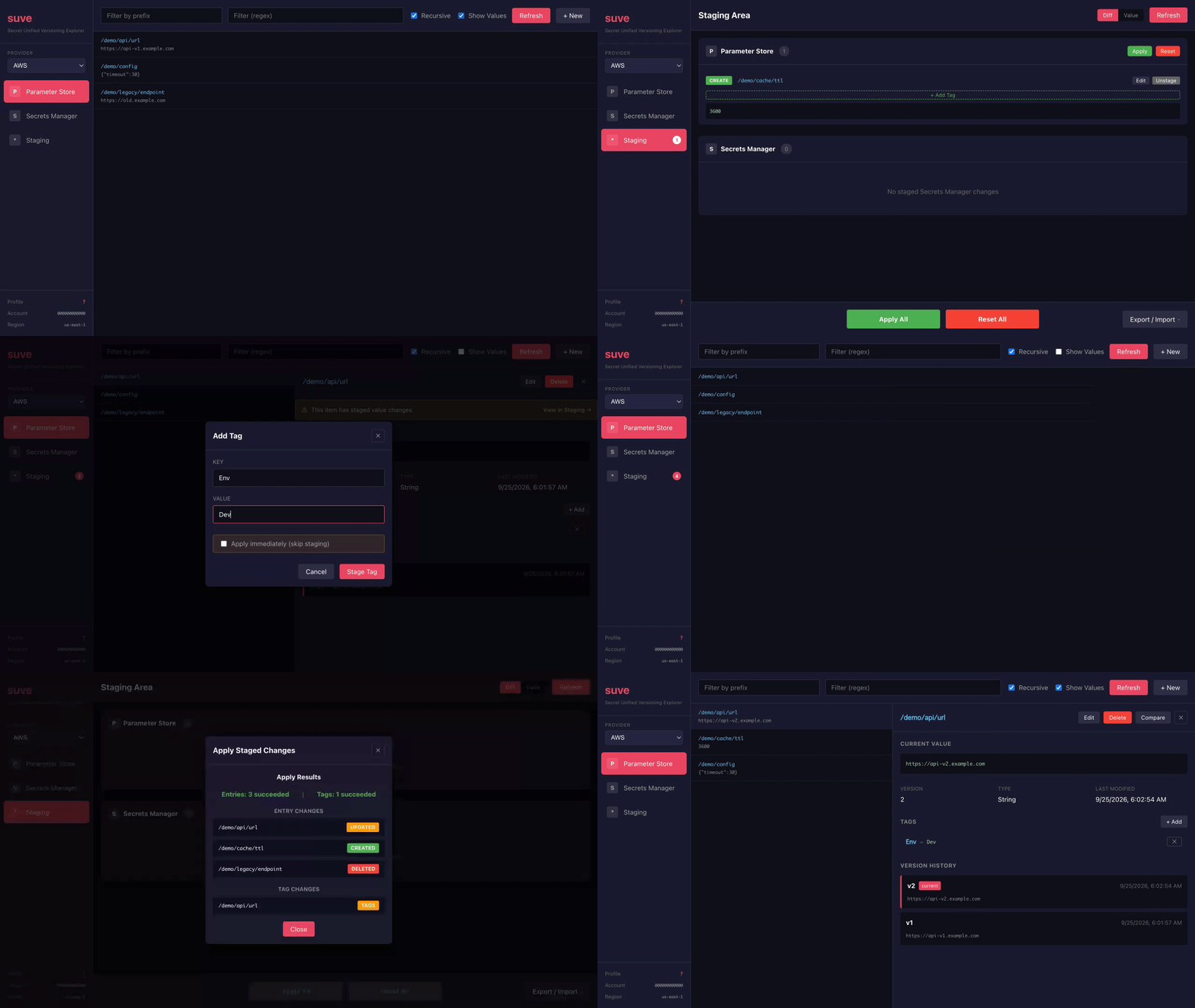
--gui launches a desktop application (built with  Wails) over the same use cases as the CLI and TUI. It ships only in the GUI-enabled build — the self-contained macOS/Windows binaries, or a Linux build with GTK3/WebKit2GTK (see Installation); the dependency-free CLI/TUI-only build has no
 --gui.
- Provider / scope: the GUI resolves the active provider from the environment just like the bare CLI aliases; when nothing is set or the choice is ambiguous it opens a provider picker instead of failing, and provider/scope stay re-selectable from within the running app.
- Tabs: one tab per service, labeled with the product name (Parameter Store / Secrets Manager on AWS, Secret Manager on Google Cloud, App Configuration / Key Vault on Azure), plus Staging. Each is gated by what the selected provider/scope supports — the same capability rules as the CLI (an unversioned backend hides version history, a secret-only provider has no param tab, and so on).
- Same operations: browse/filter, show with metadata, version history and diff, create/update/delete, and tag/untag are all available where the backend supports them; secret values are masked in passive views and revealed only on an explicit reveal or compare.
- Shared staging area: edits staged in the GUI use the same per-scope staging store as the CLI/TUI, so
suve stage statussees them andstage applyfrom either side applies the same working set.